# Do Not Disturb
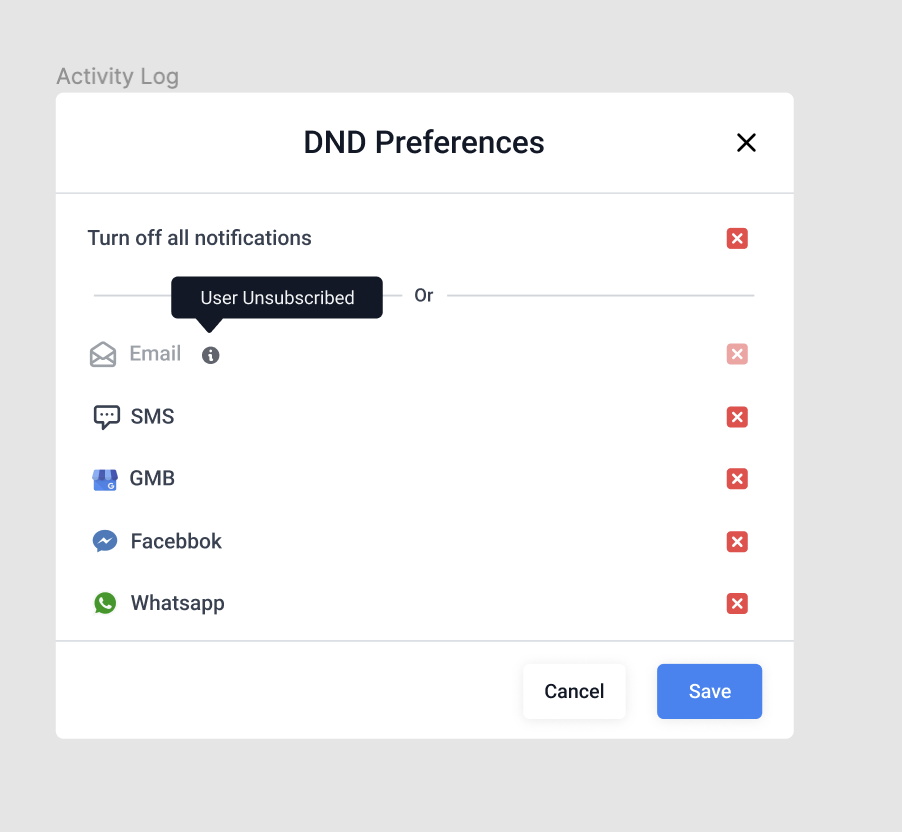
DND is also known as "Do Not Disturb". It allows you to remove a contact from one or all communication channels.
{% hint style="info" %}
**DND can now be set to individual channels (FB, SMS, Calls, Emails, GMB, WhatsApp) once they are integrated with the system.**
{% endhint %}
### **DND Statuses**
* **DND ‘On’** - now means NO automated/ manual outbound messages are permitted to go out (previously, we let people send outbound messages manually and only restricted ‘Automated’ messages)
* **DND ‘Off’** - all automated/manual messages continue to work as usual
* **DND ‘Partial’** - Some Channels are unavailable for Outbound messaging (THIS IS NEW!)
{% hint style="info" %}
* Contacts that had **DND switched ON** previously - The system will continue to respect their wishes
* For contacts that did **Not** have DND switched on previously, the system will continue as before
{% endhint %}
### **DND Integration**
If the integrations *(FB, SMS, Calls, Emails, GMB, WhatsApp)* exist and are functional, they’ll get enlisted as channels that Users can either enable or disable independently or all together at once.***If the Integrations drop or are disconnected please continue to re-connect.*** Once reconnected the previous state in which the contact DND was set to, would be respected - meaning if you DND’d contact for FB Messenger, it’ll continue to DND that contact in FB Messenger.
### **DND for Email**
The system will **Auto-Enable** **DND** for Email contact if the criteria below are met:
* **ISP email permanent failures such as** bounce, generic, suppress-complaint, suppress-unsubscribe, and suppress-bounce. ([Understanding Mailgun Suppressions](https://help.mailgun.com/hc/en-us/articles/360012287493-Understanding-Mailgun-Suppressions-Bounced-Complained-Unsubscribed-And-Whitelisted-))
* **When a recipient unsubscribes** or marks the email as **SPAM** (Mailgun complaint event).
{% hint style="info" %}
**Please Note:** Location/agency users will then have the option to disable the DND from within the contacts record for all the above reasons, except when marked as SPAM.
{% endhint %}
#### **Remove email DND for a Contact**
When a user is marked as DND for any **bounce and or suppressions events,** please head into Mailgun or your ISP provider and remove the contacts email from the suppression list, then continue to validate the email before enabling the DND in the system.
### DND for SMS
**There are 2 ways in which the DND will be enabled:**
1. 1.If the customer replied with **Opt-Out keywords** like **STOP, UNSTOP, UNSUBSCRIBE, or CANCEL**
2. 2.If we get [30003](https://support.twilio.com/hc/en-us/articles/360008508774-Error-30003-Message-Delivery-Unreachable-destination-handset-when-Sending-SMS), [30004](https://support.twilio.com/hc/en-us/articles/360008705094-Error-30004-Message-Delivery-Message-blocked-when-Sending-SMS), [30005](https://www.twilio.com/docs/api/errors/30005), [30006](https://www.twilio.com/docs/api/errors/30006) any of these error codes from Twilio
| **Response Code** | **Code Description** | **Remediation** |
| ----------------- | ----------------------------------- | -------------------- |
| 30005 | User Inactive/Number does not exist | Enable Temporary DND |
| 30003 | Out of Service/Carrier Filtering | Enable Temporary DND |
| 30004 | Do not want SMS/DND enabled | Enable Permanent DND |
| 30006 | Landline/Incapable to receive SMS | Enable Temporary DND |
**Two types of DND will be applied to a contact**
1. **Temporary ->** If we get **30003, 30005** and **30006**
2. **Permanent ->** If we get **30004** or receive **Opt-Out** keywords mentioned above
#### **Remove SMS DND for a Contact**
* **Temporary ->** Can be updated from within the contact record
* **Permanent ->** Cannot be updated from within the contact record, it can only be removed if the contact replies with **START** or the agency shares the contact's **Opt-in info** with support. Once approved, support will remove the contacts DND.
{% hint style="info" %}
**Please Note:** When sharing your opt-in info please include the relationship number(s), contact, and a loom showing the contact opt-in permission.
{% endhint %}