# Content AI

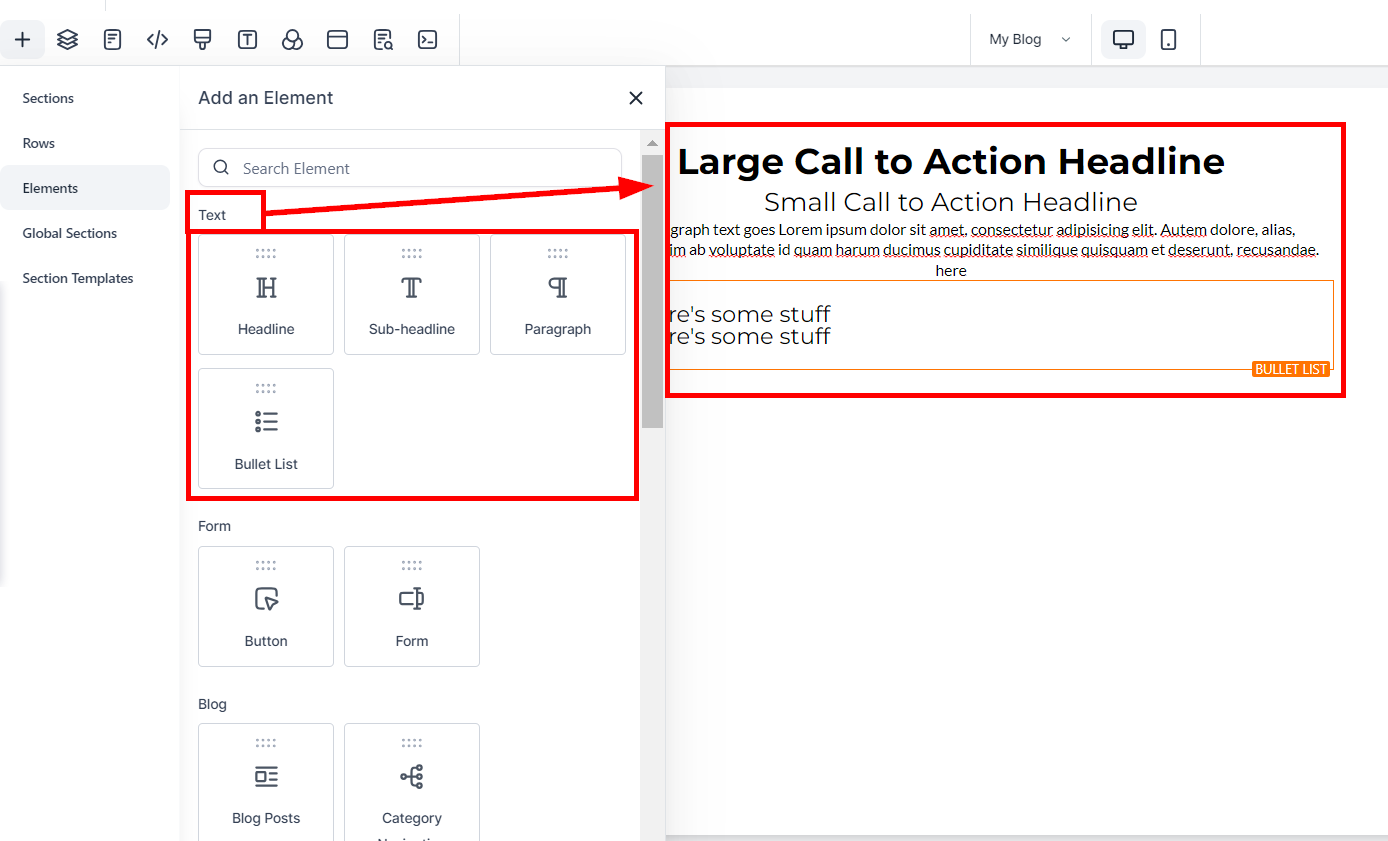
This section will teach you how to use Content AI to generate content for Funnels/Websites. Content AI helps generate 10X faster, more effortless, and better Content. It can only generate Content AI for Text Elements: Headlines, Sub-headlines, paragraphs, and Bullet lists.

{% hint style="info" %}
**Please Note:**

This feature is a paid service and will incur charges based on usage.
{% endhint %}

### Adding Content AI to Funnel/Websites Text Elements <a href="#adding-content-ai-to-funnel-websites-text-elements" id="adding-content-ai-to-funnel-websites-text-elements"></a>

You can edit existing [Funnels](https://crmhelpcenter.gitbook.io/entrepreneur-club/sites/websites-and-funnel-training/funnels) or [Websites](https://crmhelpcenter.gitbook.io/entrepreneur-club/sites/websites-and-funnel-training/websites) or create a new one from scratch.

<div><figure><img src="https://953459931-files.gitbook.io/~/files/v0/b/gitbook-x-prod.appspot.com/o/spaces%2F2RjsAyiXnDibDuY7JKcM%2Fuploads%2FuPHPsWM5klK26H9YHXuO%2Fspaces_z59Vqr25L1jt6xe60FDS_uploads_git-blob-6538b54eb45c6c9131115089a8edf6b80ff0b42a_Funnel_Website-Content_AI_1.png?alt=media&#x26;token=7983668f-b7ed-401c-b10a-d06913f4b51c" alt=""><figcaption></figcaption></figure> <figure><img src="https://953459931-files.gitbook.io/~/files/v0/b/gitbook-x-prod.appspot.com/o/spaces%2F2RjsAyiXnDibDuY7JKcM%2Fuploads%2F0GfS40FG92sLHWi0EhOv%2Fspaces_z59Vqr25L1jt6xe60FDS_uploads_git-blob-357b70f09a50b6c344be403034a77e819f66e3c8_Funnel_Website-Content_AI_2.png?alt=media&#x26;token=93d3e59b-19c8-4733-94e1-8a9a11a32dba" alt=""><figcaption></figcaption></figure></div>

**Add Text Element**

You can drag and drop any Text elements or edit an existing one inside the Funnel or Website Builder.

<figure><img src="https://3652255517-files.gitbook.io/~/files/v0/b/gitbook-x-prod.appspot.com/o/spaces%2Fz59Vqr25L1jt6xe60FDS%2Fuploads%2Fgit-blob-e8dcf964db6169b183c4a0979528b80c15b2913c%2FFunnel_Website-Content_AI_3.png?alt=media" alt=""><figcaption></figcaption></figure>

#### Add Content AI <a href="#add-content-ai" id="add-content-ai"></a>

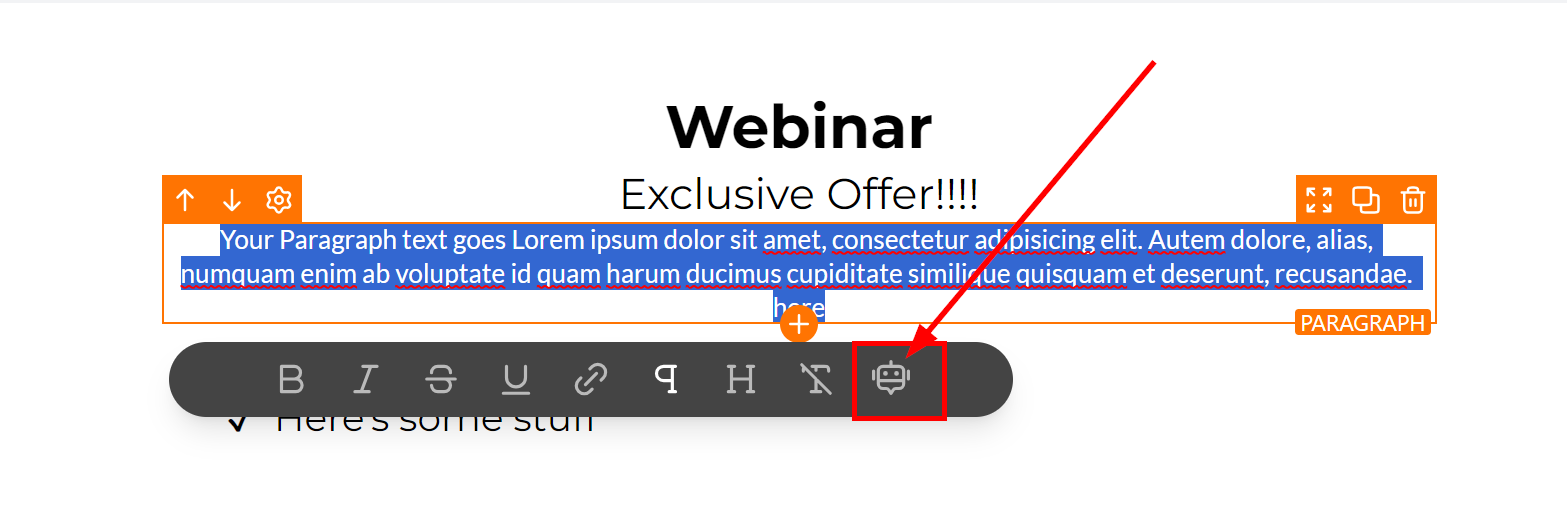
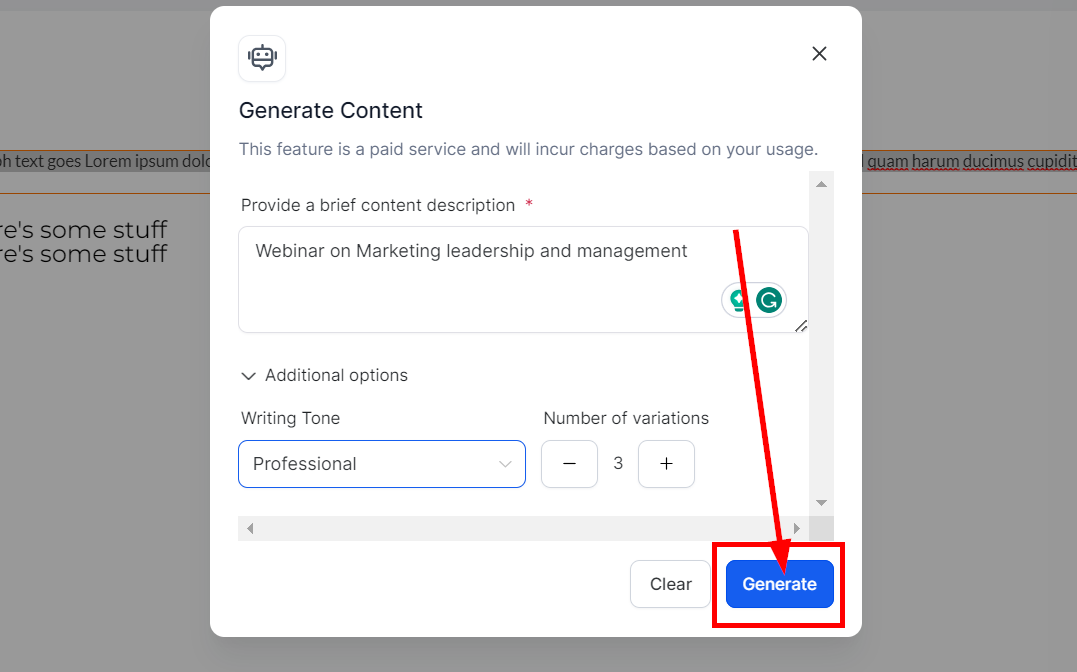
To access the Content AI, highlight the default texts in the element. Click on the Content AI button and fill out the info needed to generate Content AI:

<figure><img src="https://3652255517-files.gitbook.io/~/files/v0/b/gitbook-x-prod.appspot.com/o/spaces%2Fz59Vqr25L1jt6xe60FDS%2Fuploads%2Fgit-blob-98f4a578c89e97828854fe053060453abfe52bbf%2FFunnel_Website-Content_AI_4.png?alt=media" alt=""><figcaption></figcaption></figure>

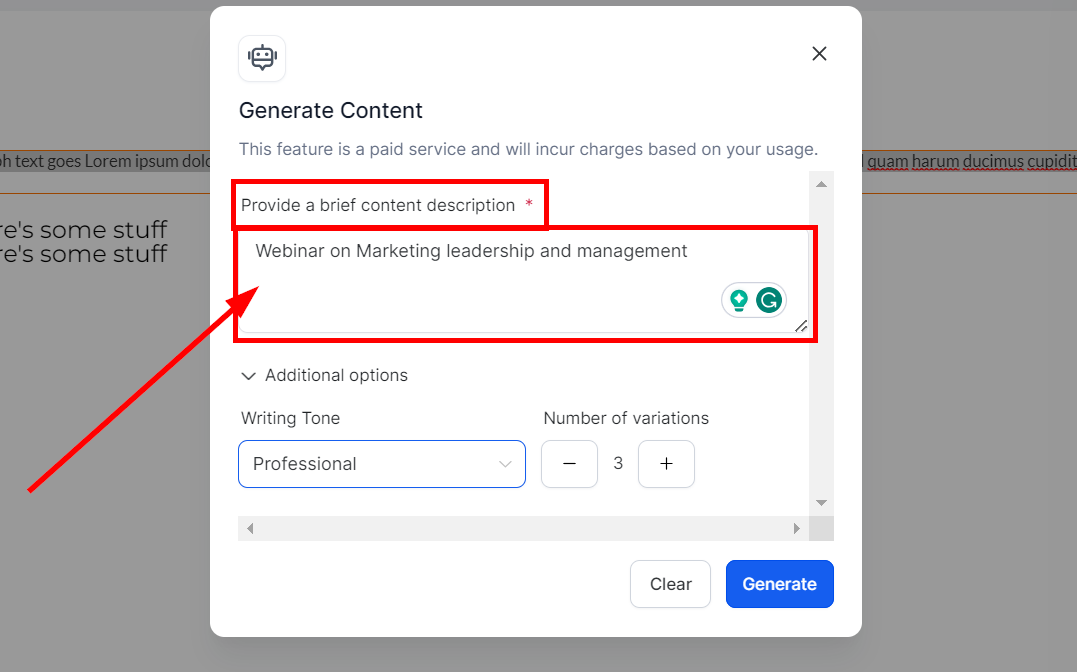
* **Description** Provide a brief description to understand the context better with a maximum of 2-3 lines. For example,

<figure><img src="https://3652255517-files.gitbook.io/~/files/v0/b/gitbook-x-prod.appspot.com/o/spaces%2Fz59Vqr25L1jt6xe60FDS%2Fuploads%2Fgit-blob-613c3847b3e7b9a6b9e592ef2283766635ebf260%2FFunnel_Website-Content_AI_5.png?alt=media" alt=""><figcaption></figcaption></figure>

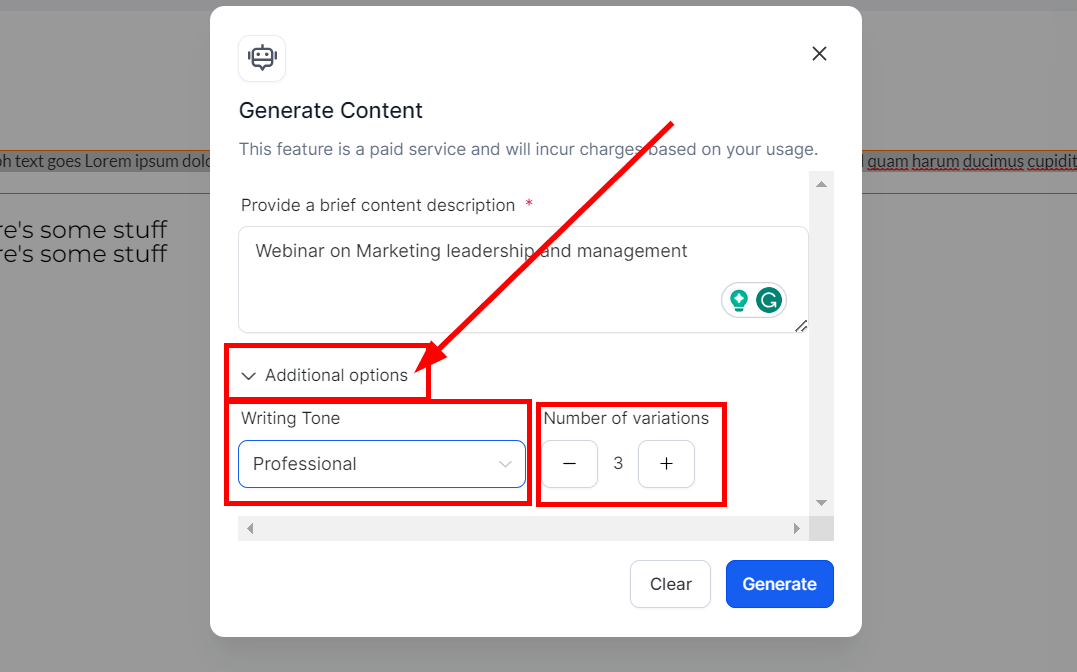
* **Additional Option** You can see the additional options available for generating this content
  * **Writing Tone** Choose the tone for your text from options like Funny, Excited, Casual, etc
  * **Number of Variations** Choose the Number of variations you'd like the AI to create from 1 to 5

<figure><img src="https://3652255517-files.gitbook.io/~/files/v0/b/gitbook-x-prod.appspot.com/o/spaces%2Fz59Vqr25L1jt6xe60FDS%2Fuploads%2Fgit-blob-790e865dc41a7546c23682ceadba956281e24816%2FFunnel_Website-Content_AI_6.png?alt=media" alt=""><figcaption></figcaption></figure>

#### **Generate Content AI** <a href="#generate-content-ai" id="generate-content-ai"></a>

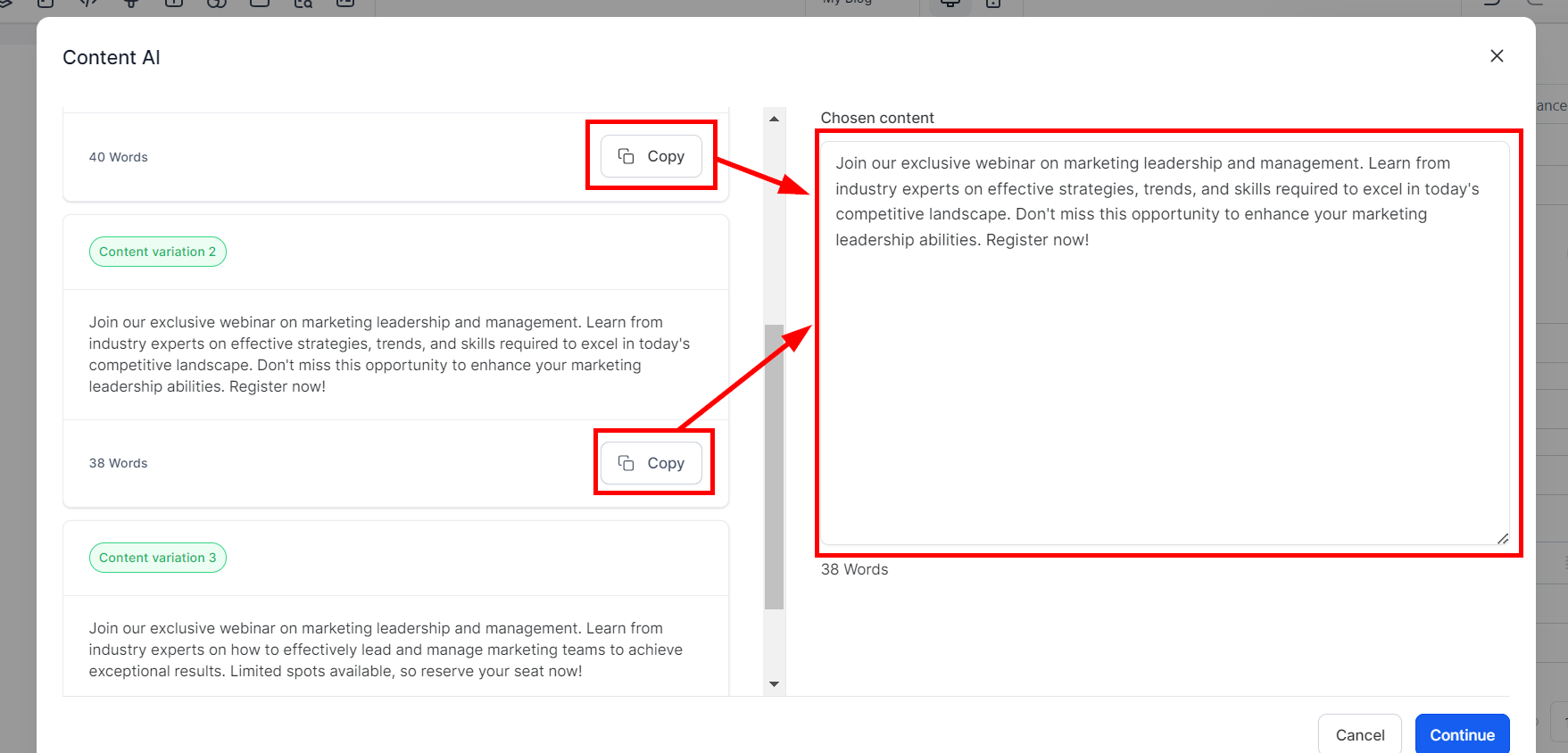
Once you are done updating this content, click on the **Generate** button. This will direct you to the Content AI page to choose from the content variations generated from the description and writing tone you provided.

To edit any info you provided, click the **Generate new content** button to return you to the content generation page.

<div><figure><img src="https://953459931-files.gitbook.io/~/files/v0/b/gitbook-x-prod.appspot.com/o/spaces%2F2RjsAyiXnDibDuY7JKcM%2Fuploads%2FNg7kM3MLcp4K91W28FQw%2Fspaces_z59Vqr25L1jt6xe60FDS_uploads_git-blob-7602a6290e98e65a5890fee0e14e71aeaf295f99_Funnel_Website-Content_AI_7.png?alt=media&#x26;token=5c464f6b-5955-491c-9d45-1968a4b2278c" alt=""><figcaption></figcaption></figure> <figure><img src="https://953459931-files.gitbook.io/~/files/v0/b/gitbook-x-prod.appspot.com/o/spaces%2F2RjsAyiXnDibDuY7JKcM%2Fuploads%2Fgkghvf3NOfHH7gR67MQ9%2Fspaces_z59Vqr25L1jt6xe60FDS_uploads_git-blob-497eae91a8f2feefeaae7a4f7d2358a719dc99d0_Funnel_Website-Content_AI_7a.png?alt=media&#x26;token=26a1ad98-7592-496c-888b-2eccc7c30bfe" alt=""><figcaption></figcaption></figure></div>

**Copy Content**

Click the Copy button to choose the content variation you want to use. Once you click **Copy**, the selection appears in the Text box on the right corner of the page for preview and editing.

<figure><img src="https://3652255517-files.gitbook.io/~/files/v0/b/gitbook-x-prod.appspot.com/o/spaces%2Fz59Vqr25L1jt6xe60FDS%2Fuploads%2Fgit-blob-109c7a52154d2c4475f74ba2f048801dca8028c8%2FFunnel_Website-Content_AI_8.png?alt=media" alt=""><figcaption></figcaption></figure>

#### Create Content AI Post <a href="#create-content-ai-post" id="create-content-ai-post"></a>

Once you have chosen the variation you want to use, click the **Continue** button to paste it into the Text element box you've selected.

<div><figure><img src="https://953459931-files.gitbook.io/~/files/v0/b/gitbook-x-prod.appspot.com/o/spaces%2F2RjsAyiXnDibDuY7JKcM%2Fuploads%2FrCl9kjVg2ApMLbNFEUx9%2Fspaces_z59Vqr25L1jt6xe60FDS_uploads_git-blob-42234a8e5e07dc05c108d9692787992a93c7530d_Funnel_Website-Content_AI_9.png?alt=media&#x26;token=7a189931-e102-40e6-b8c8-ed6b2243988a" alt=""><figcaption></figcaption></figure> <figure><img src="https://953459931-files.gitbook.io/~/files/v0/b/gitbook-x-prod.appspot.com/o/spaces%2F2RjsAyiXnDibDuY7JKcM%2Fuploads%2FP9PepT0VL5GkjX9QG5vC%2Fspaces_z59Vqr25L1jt6xe60FDS_uploads_git-blob-e09487b1898cdd5644d29bbb4813500e7fc16b3e_Funnel_Website-Content_AI_9a.png?alt=media&#x26;token=03b4270d-c4f5-48d1-847e-902840181957" alt=""><figcaption></figcaption></figure></div>